

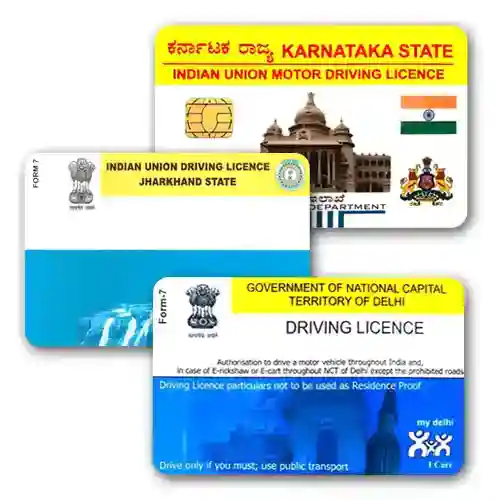

Driving licence PVC card: what you get
A wallet-size PVC print of your own driving licence, made from the DigiLocker or mParivahan PDF, or a scan, that you upload at checkout. We print the file exactly as it is: no editing, no corrections, no changes to the photo, the licence number or the vehicle classes. We are not the transport department and we do not issue, renew or replace licences. The card is a convenience copy that survives rain, wallets and daily handling better than a paper or laminated licence. It does not replace the licence itself.
This one page covers licences from every state and union territory. Choose your state in the box above the Add to cart button so our print team knows which layout to expect.
Why one page for all states
Every state RTO prints its own licence design, but the file you receive from DigiLocker or mParivahan is the same format everywhere, and our job is the same everywhere: reproduce your file faithfully on a CR80 card. We used to keep a separate page for each state. They said the same thing 30 times, so we merged them here and put the state-specific notes in one place below.
Where to get your licence file, by state
All states and UTs issue licences through the central Sarathi system, so the same three sources work everywhere:
- DigiLocker (app or digilocker.gov.in): Issued Documents → Ministry of Road Transport and Highways → Driving Licence. Enter your DL number and date of birth, then download the PDF.
- mParivahan app: add your DL under My Documents and use the share or download option to save the virtual DL.
- Sarathi Parivahan (sarathi.parivahan.gov.in): choose your state, go to Driving Licence → Print Driving Licence, enter the application or DL number and date of birth, and save the print view as a PDF.
Your licence number begins with the two-letter state code and the RTO code, for example MH12 for Pune, KA01 for Bengaluru Central, DL1 for Delhi, WB01 for Kolkata, UP32 for Lucknow, TN07 for Chennai South, KL07 for Ernakulam, GJ01 for Ahmedabad, RJ14 for Jaipur, AP39 for Andhra Pradesh after reorganisation, TS09 for Hyderabad, MP09 for Indore, BR01 for Patna, OD02 for Bhubaneswar, HR26 for Gurugram, PB10 for Ludhiana, HP01 for Shimla, UK07 for Dehradun, JH01 for Ranchi, CG04 for Raipur, AS01 for Guwahati, JK01 for Srinagar, MN01 for Imphal, ML05 for Shillong and SK01 for Gangtok. Check that the whole number on your file is clear and that none of it is cut off.
State notes that affect your print
- Maharashtra, Karnataka, Delhi, Haryana, Bihar, Himachal Pradesh and Jammu and Kashmir moved to the new MoRTH card format (notified in 2019 and rolled out state by state). A DigiLocker PDF of the new format prints cleanly; an older laminated licence should be scanned flat.
- Kerala issues PVC smart-card licences with a chip. We print the image of the card only; the chip is not reproduced and the printed copy has no chip.
- Gujarat issues digital learner licences through its online test system. A learner licence is a different document from a permanent licence; this product is for the permanent licence, though we can print a learner licence file on request.
- Andhra Pradesh, Telangana, Rajasthan and Assam have accepted DigiLocker and mParivahan copies at par with the physical licence for several years, following the 2018 MoRTH advisory. Carry your digital copy as well as our print.
- West Bengal and Odisha still issue many paper-format licences. Scan them at 300 dpi or more with all four edges visible; a phone photo taken at an angle cannot be straightened.
- Punjab licences carry a QR code. Upload the PDF rather than a scan so the QR stays sharp enough to scan after printing.
Check these before you order
- Is the licence still valid? We print the file as it is and do not check validity. Renew first through Sarathi Parivahan or your RTO, then upload the updated file.
- Read the name, date of birth, licence number, validity dates and vehicle classes on your file against your original. We cannot correct a mistake after printing.
- We do not print on chip cards. If your licence has a chip, only the chip image is printed.
- Ask whoever needs to see your licence (a traffic officer, an insurer, a rental company) what they will accept. Keep the original or your DigiLocker copy with you.
Common questions
Will a traffic officer accept the printed card?
Officers are told to accept DigiLocker and mParivahan copies. A printed copy is not an official document, so treat it as a wallet convenience and keep the digital copy on your phone.
My licence number and date of birth are correct but the portal shows no record. Can you still print?
Yes, from a clear scan of the physical licence. We cannot look up or fetch your licence for you.
Can you print the back side too?
Yes. Upload both sides as separate files at checkout and both are printed on one card.
Do you print licences for two-wheeler, LMV and transport classes differently?
No. The classes are part of your file and are printed as they appear.
Other cards you may need
Carrying your vehicle papers too? See the RC PVC card. Many customers also order the PVC PAN card and the PVC Voter ID card in the same parcel.
- Upload: add the card to your cart and upload a clear file at checkout. A PDF from the official portal (DigiLocker, mParivahan, UMANG and similar) prints sharpest; a flat 300 dpi scan also works. We print the file as it is and do not edit or correct any detail.
- Printing and dispatch: printing usually takes about 72 hours. We try to dispatch the same day printing finishes and ship by Speed Post. At dispatch we send the tracking number and photos of your card to your WhatsApp number.
- Card: PVC, 85.60 x 53.98 mm (standard credit-card size), UV print, made by DM Incorporation, Yavatmal.
- Payment and cancellation: online payment only, no cash on delivery. Orders can be cancelled only before printing starts. Damaged or misprinted cards are reprinted free if you contact us within 7 days with photos.
Read the full ordering, delivery and refund details or WhatsApp us on +91 92846 08837.
| Weight | 0.02 kg |
|---|---|
| Dimensions | 10 × 10 × 2 cm |
Related products

ID & Welfare Cards

Health & Insurance Cards
MEDISEP (Medical Insurance Scheme for State Employees and Pensioners) Kerala PVC Card Printing
Insurance Cards

Other Cards

ID & Welfare Cards
ID & Welfare Cards

PVC Card Printing