

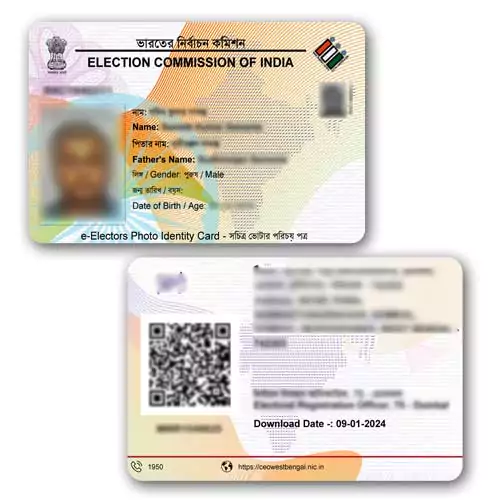


PVC Voter ID Card: what you get
A PVC Voter ID Card printed from the e-EPIC PDF that you download from your own Voter Helpline account. The card has your details, photo and QR code exactly as they appear in your PDF. We print it as it is. We do not edit, correct or change any detail. It is a printed copy of your document. We are not the Election Commission and we do not issue or change voter details.
What an e-EPIC is
An e-EPIC is the digital version of the Elector Photo Identity Card. An Election Commission FAQ (published by the Goa Chief Electoral Officer, 2021) describes it as a secure PDF version of the EPIC, about 250 KB in size, that you can keep on your phone, upload to DigiLocker, or print and self-laminate. The same FAQ says a printed e-EPIC can be shown as proof of identity at a polling station. It is issued in addition to the existing plastic EPIC, not instead of it. Whether another office accepts a printed copy is for that office to decide, so ask before you rely on it.
How to download your e-EPIC
As the Election Commission FAQ explains, you can download it from the Voter Portal or the Voter Helpline app:
- Log in and open the Download e-EPIC option.
- Enter your EPIC number or your Form Reference Number.
- Enter the OTP sent to your mobile number registered in the electoral roll.
- Save the PDF.
If no mobile number is registered against your name, the FAQ says you first need to complete eKYC, which uses a face liveness check on a device with a camera, and update your number. If eKYC fails, it says to visit the office of your Electoral Registration Officer with a photo ID. If you do not know your EPIC number, you can search for it in the electoral roll. Portal menus and rules can change, so follow the wording on the screen. For more help, read our guide to applying for and tracking a Voter ID. The official page is voters.eci.gov.in.
Check these before you order
- We print exactly what is in your PDF. If your name, photo or address is wrong, correct it on the official portal first and download a fresh PDF.
- Upload the original PDF from the portal. Screenshots and photos of a card give a poor print and a blurred QR code.
- Read the EPIC number on the file against your original card.
Other cards you may need
See also the PVC PAN card print and the driving licence PVC card.
- Upload: add the card to your cart and upload a clear file at checkout. A PDF from the official portal (DigiLocker, mParivahan, UMANG and similar) prints sharpest; a flat 300 dpi scan also works. We print the file as it is and do not edit or correct any detail.
- Printing and dispatch: printing usually takes about 72 hours. We try to dispatch the same day printing finishes and ship by Speed Post. At dispatch we send the tracking number and photos of your card to your WhatsApp number.
- Card: PVC, 85.60 x 53.98 mm (standard credit-card size), UV print, made by DM Incorporation, Yavatmal.
- Payment and cancellation: online payment only, no cash on delivery. Orders can be cancelled only before printing starts. Damaged or misprinted cards are reprinted free if you contact us within 7 days with photos.
Read the full ordering, delivery and refund details or WhatsApp us on +91 92846 08837.
Related products
Health & Insurance Cards

Health & Insurance Cards

Payment QR Cards

Health & Insurance Cards

ID & Welfare Cards

Health & Insurance Cards
