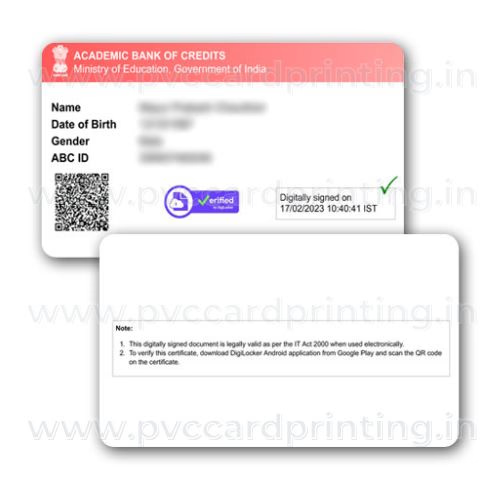
APAAR ID Card PVC Print
₹50
- ~72 hoursprinting time
- Speed Postall India delivery
- Card photoson WhatsApp at dispatch
- Online paymentsecure, no COD
A PVC print of your own APAAR ID card from the DigiLocker file you upload. Printed as it is. Your school creates the APAAR ID, not us.
Upload your file & order
PDF, JPG or PNG. Your files stay private and are deleted after delivery.
Need help? WhatsApp 9284608837
This is a wallet-size PVC print of your APAAR ID card, made from the file you upload. We print it as it is and do not edit, correct or change any detail.
We are not the education department or your school, and we do not create APAAR IDs.
What you get
- APAAR ID card printed on a CR80 PVC card
- Speed Post delivery with tracking and card photos on WhatsApp
About the APAAR ID and how it is created
APAAR is a 12-digit code for students under the One Nation, One Student ID initiative. It is meant to be a permanent digital student identity that stores academic records such as marksheets, degrees, certificates and co-curricular achievements.
- Your school creates the APAAR ID. The student needs a PEN (the UDISE+ student identifier), and the name in UDISE+ must match the name on the Aadhaar.
- The school verifies the details with the student. For a minor the parents give consent, which is voluntary.
- The ID is then generated and pushed to the student’s DigiLocker account. The virtual APAAR ID card appears under Issued Documents in DigiLocker. Upload that file here.
How to order
- Open DigiLocker, go to Issued Documents, and download your APAAR ID card PDF.
- Add the card to your cart and add any note for the print team.
- Upload your file, and the back side if you want it printed too. Check the details on the file are readable.
- Pay online. Cash on delivery is not available.
- Printing usually takes about 72 hours. After dispatch we send the Speed Post tracking number and a photo of your card on WhatsApp.
Check before you order
- Read the student name and the 12-digit APAAR ID on your file against your original. We cannot correct a mistake after printing.
- Upload the original file, not a photo of a screen.
Frequently asked questions
Can you create an APAAR ID for me?
No. The school creates it after verifying the student’s details and getting parental consent for minors.
Where do I find my APAAR ID card?
In DigiLocker under Issued Documents, once your school has generated the ID.
Is a general student or staff card available?
Yes. See the custom PVC ID card for schools and organisations.
How long does it take and how is it delivered?
Printing usually takes about 72 hours and we try to dispatch the same day printing finishes. Delivery is by Speed Post, and we send the tracking number and card photos on WhatsApp. Payment is online only; there is no cash on delivery.
Related cards
Ordering & delivery
- Upload: upload a clear file on this page, then add the card to your cart. A PDF from the official portal (DigiLocker, mParivahan, UMANG and similar) prints sharpest; a flat 300 dpi scan also works. We print the file as it is and do not edit or correct any detail.
- Printing and dispatch: printing usually takes about 72 hours. We try to dispatch the same day printing finishes and ship by Speed Post. At dispatch we send the tracking number and photos of your card to your WhatsApp number.
- Card: PVC, 85.60 x 53.98 mm (standard credit-card size), made by DM Incorporation, Yavatmal.
- Payment and cancellation: online payment only, no cash on delivery. Orders can be cancelled only before printing starts. Damaged or misprinted cards are reprinted and sent again.
Read the full ordering, delivery and refund details or WhatsApp us on +91 92846 08837.